With Claude (MCP) you talk to Claude and Claude uses BIMit for you: “turn the client's WBS table into a configuration and write it to the model”, “export the revised sheets to PDF”, “which project parameters are empty?”. Claude sees all the BIMit tools (WBS, parameters, sheets, model, MEP) and uses them on the open model, with your Claude account. It also works with several Revit sessions open at once. It is optional: if you don't turn it on, BIMit works as always.
The MCP Server panel#
On the BIMit tab, the MCP Server panel has two buttons:
| Button | What it does |
|---|---|
 MCP On / MCP Off MCP On / MCP Off | Turns the server on or off in this Revit. The icon is green when it is on (MCP On), red when it is off (MCP Off). With the server off in every Revit, Claude sees only the tools bimit_stato, which explains how to turn it on, and revit_istanze. |
 Config MCP Config MCP | Copies the connection prompt to the clipboard and opens the Config MCP window (below). |
First time#
- Install Claude Desktop and sign in with your Claude account.
- In Revit open a model and click Config MCP: the prompt is already copied.
- Paste it into Claude Code (the Code tab of Claude Desktop, or
claudein the terminal) and send it. Claude adds the BIMit server with your PC's address, authorizes its tools and also adds it to the Claude Desktop chat. If you use only the chat, Add to Claude Desktop in the window is enough. - Restart Claude: quit Claude Desktop from the notification area of the taskbar (near the clock, Quit) and open it again.
- In Revit click MCP Off so that it becomes MCP On (green). Try in Claude: “Which model is open in Revit?”
From then on, just click MCP On in Revit. If you turn on another Revit with Claude already open, Claude usually sees the new tools by itself after a few seconds; if it doesn't, open a new conversation or restart Claude.
The Config MCP window#
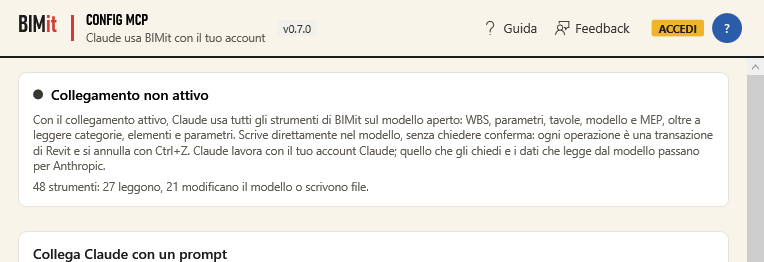
| Item | What it does |
|---|---|
| Connection active / not active | Whether Claude can use BIMit in this Revit right now. The connection exists only on your computer and for your user, and it turns off when you close Revit. Below, how many tools Claude sees. |
| Connected Revit sessions | The Revit sessions with MCP On on this PC: version, identifier (year and process number, for example 2025-18244: it is what Claude uses to choose between them), BIMit version and the time MCP was turned on. (this one) is the Revit from which you opened the window. The list updates by itself every few seconds. |
| Connect Claude with a prompt · Copy prompt | The connection prompt for Claude Code: the claude mcp add command with BIMit's address on this PC, the authorization of its tools (mcp__bimit) and the entry for the Claude Desktop chat. |
| Add to Claude Desktop | Adds BIMit to the MCP servers of the Claude Desktop chat, without a prompt. The rest of Claude's configuration does not change (a copy of the previous file is kept). |
| Other MCP clients | The JSON configuration for the other clients (Cursor, VS Code…), with Copy. |
| MCP On / MCP Off (at the bottom) | Same as the button on the tab. |
| Claude's recent operations | Every tool Claude has used: time, name, outcome, duration. |
What Claude can do#
The same tools as the buttons, plus some for reading the model (in italics the ones that modify the model or write files):
| Group | Tools |
|---|---|
| Open model | modello_info, categorie, elementi, parametri_elemento, imposta_parametri, selezione, seleziona, viste, leggi_tabella (Excel or CSV, for example the client's table) |
| WBS | wbs_guida, wbs_configurazione, wbs_salva_configurazione, wbs_anteprima, wbs_scrivi, wbs_valori, wbs_dizionario_esporta, wbs_dizionario_carica |
| Export | tavole_preset, tavole_salva_preset, tavole_collega_preset, tavole_profili, tavole_profilo_salva, tavole_profilo_applica, tavole_profilo_elimina, tavole_profilo_rinomina, tavole_profili_importa, tavole_profilo_predefinito, tavole_elenco, tavole_parametri, tavole_nomi_anteprima, tavole_selezione_salva, tavole_selezione_elimina, tavole_imposta_elementi, tavole_coda, tavole_coda_modifica, tavole_esporta, tavole_report, tavole_elenco_elaborati, tavole_apri, tavole_pianificazioni, tavole_pianifica, tavole_pianificazione_gestisci |
| Parameters | parametri_categorie_e_gruppi, parametri_condivisi_leggi, parametri_condivisi_aggiungi, parametri_progetto, parametri_progetto_elimina, parametri_progetto_csv, famiglie_elenco, famiglie_parametri, famiglie_elimina_parametri |
| Model | sblocca_analizza, sblocca, livelli, sposta_livello_analizza, sposta_livello, esporta_per_ia_tabelle, esporta_per_ia, esporta_per_ia_leggi |
| MEP | mep_modelli, manicotti_opzioni, manicotti_salva_opzioni, manicotti_analizza, manicotti_crea, locali_spazi_analizza, locali_spazi |
| Several Revit sessions | revit_istanze, revit_usa; with two or more Revit sessions on, every tool also has the “revit” argument |
Every tool also accepts the optional argument “documento”: the title, the file name or the full path of a document open in that Revit. This way Claude reads or modifies an open model without you having to make it active; without it, Claude uses the active document.
Several Revit sessions at once#
You can turn MCP On in several Revit sessions open at the same time, even of different versions (for example 2024 and 2026, or two 2025): Claude sees them all.
- Which ones — “which Revit sessions are open?”: Claude uses revit_istanze, which for each
Revit gives the identifier (year and process number, for example
2025-18244), the Revit and BIMit versions and the open documents. - Which one to use — “use Revit 2024” or “work on the Hospital model”: Claude uses revit_usa with the identifier, the process number, the year (if there is only one Revit of that version) or the title of an open document. From then on Claude works on that Revit.
- For a single request — with two or more Revit sessions every tool has the optional argument “revit”: Claude sends the request to a specific Revit without changing the one chosen.
- All at once — with “revit” set to “tutte” the tool runs on every Revit and the answer has a section for each: “in all the open Revit sessions, how many doors are there?”.
- With only one Revit on, Claude uses that one. With several Revit sessions and no choice made, Claude receives the list and chooses, or asks you which one to use.
The list is also in the Config MCP window, under Connected Revit sessions.
Good to know#
- Claude writes directly to the model, without asking for confirmation. Each operation is a Revit transaction: Ctrl+Z undoes it.
- While a Revit or BIMit window that blocks Revit (a dialog box) is open, Claude waits: close it and Claude carries on.
- You can connect several Revit sessions at once (see Several Revit sessions at once). After updating from BIMit 0.7, restart Claude once: as long as it uses the connection of the previous version, it sees only one Revit.
- What you ask Claude and the model data it reads go through Anthropic, with your account (see the privacy policy).
- For the WBS, Claude starts from the configuration linked to the model, the same one used by the WBS window: what Claude saves you find there, and vice versa.