The code of every element, where each part comes from, what to fix. It opens from the WBS window or from the BIMit tab (Shift + click: active view only).
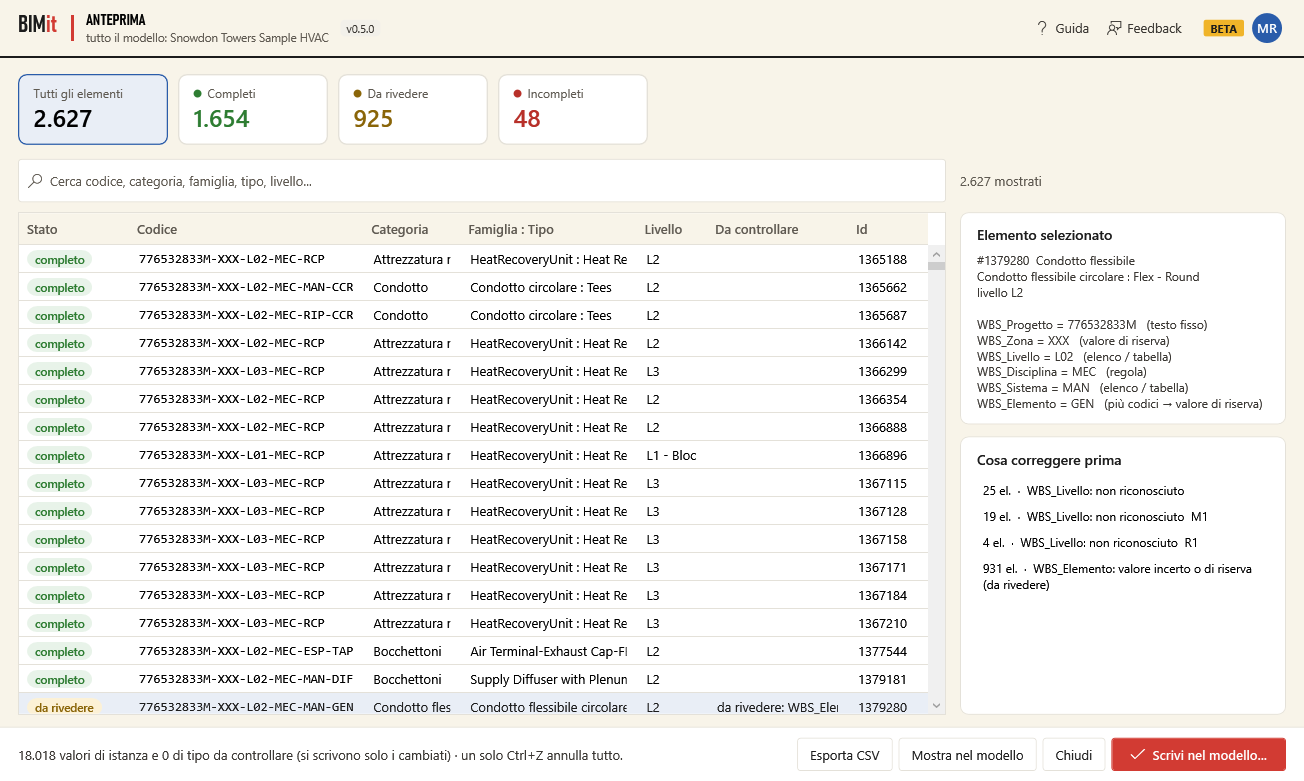
| Item | What it does |
|---|---|
| Cards at the top | All elements, Complete, To review, Incomplete: click a card to filter the table. |
| Search | Filters by code, category, family, type, level… |
| Table | Status, Code, Category, Family : Type, Level, To check (the problems), Id. Click a header to sort. |
| Selected element | For the chosen row: each parameter with its value and where it comes from (fixed text, rule, list / table, analysis (certain), analysis (uncertain), fallback value, decided by you, failed…) and the problems (✖). |
| What to fix first | The problems sorted by number of elements: start with the first. |
| Export CSV | Saves all rows to a CSV to open in Excel. |
| Show in model | Closes and selects the chosen elements in Revit (several rows with Ctrl or Shift). If you choose none, it selects all those shown by the filter. |
| Close | Closes. |
| Write to model… | Goes to the summary before writing. |