To use BIMit you need a personal account (free during the beta). The window appears by itself the first time you use a command, or with the Account button on the BIMit tab.
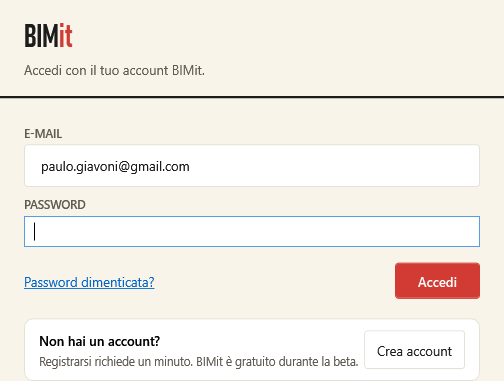
| Item | What it does |
|---|---|
| E-MAIL, PASSWORD | Your BIMit account credentials. |
| Forgot password? | Sends you an e-mail to choose a new one. Enter your e-mail in the field above first. |
| Sign in | Signs you in. The sign-in stays valid offline for up to 30 days. |
| Create account | Opens the registration form (below). |
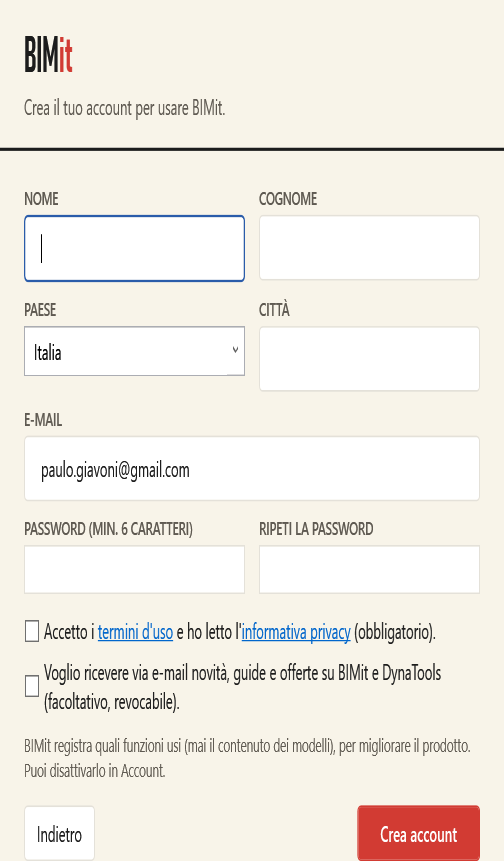
| Field | Notes |
|---|---|
| FIRST NAME, LAST NAME, COUNTRY, CITY | Required. |
| This will be your user name. | |
| PASSWORD (MIN. 6 CHARACTERS), REPEAT PASSWORD | Must match. |
| I accept the terms of use and have read the privacy policy | Required. The links open the texts. |
| I want to receive news by e-mail… | Optional; you can change it whenever you like in Account. |
| Back | Returns to sign-in. |
| Create account | Creates the account and signs you in. |
If you already have an account but the profile is missing, BIMit asks only for the missing data (Continue button).