Account#
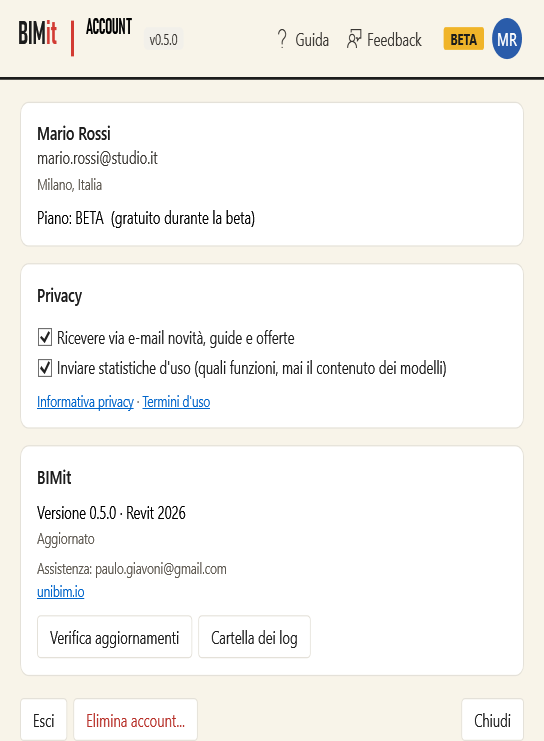
| Item | What it does |
|---|---|
| Name, e-mail, city, plan | Your profile data. |
| Receive news, guides and offers by e-mail | Marketing consent: you give or withdraw it here. |
| Send usage statistics | Which features you use (never the content of your models). Uncheck it to stop sending them. |
| Privacy policy · Terms of use | Open the texts. |
| Version · Revit | BIMit and Revit versions, and the update status. |
| Check for updates | Checks right now whether there is a new version. |
| Log folder | Opens the technical log folder (useful for support). |
| unibim.io | Opens the website. |
| Sign out | Signs out of the account on this PC. |
| Delete account… | Deletes immediately and permanently your account, profile, statistics and messages. Asks for confirmation. |
| Close | Closes. |
Feedback#
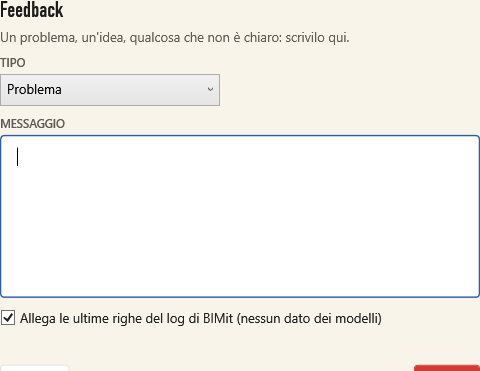
Choose the TYPE (Problem, Idea, Question, Other), write the MESSAGE and click Send. Attach the last lines of the log helps to understand an error: it contains only BIMit technical data, never data from your models.
Update#
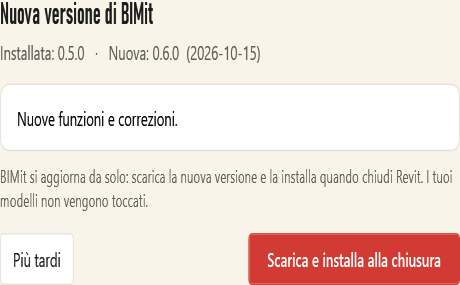
| Button | What it does |
|---|---|
| Download and install on close | Usually not needed: BIMit does this by itself at startup. Downloads the new version, verifies its integrity and installs it when you close Revit. Models are not touched. If the update is already downloaded, the window says so. |
| Later | Closes. If the update is already downloaded (Update ready) it installs anyway when you close Revit; otherwise BIMit tries again by itself at the next startup. |