
Introduction#
In the world of Building Information Modeling (BIM), data quality is not a differentiator — it's the foundation upon which successful projects are built. Poor quality IFC files lead to coordination failures, expensive rework, and frustrated teams. Yet manual quality checks are time-consuming, inconsistent, and often skipped under deadline pressure.
What if you could validate your IFC models in minutes, for free, without installing any software?
That's exactly what the IFC Quality Analysis Dashboard delivers. Built in Python and designed to run on Google Colab, this tool performs 10 comprehensive quality checks based on ISO 19650 and buildingSMART standards — providing instant insights into your model's health.

What Does the Dashboard Analyze?#
The tool performs 10 automated quality checks, each focusing on a critical aspect of BIM data quality:
1. Project Information (ISO 19650 Compliance)#
Verifies the presence of essential project metadata:
- Project Name
- Description
- Phase
- Owner History (authoring application, organization)
Why it matters: Without proper project information, models become orphaned files without context. This is fundamental for information management and audit trails.
2. Spatial Structure Hierarchy#
Validates the logical structure: Site → Building → Storey → Space
Checks:
- Presence of IfcSite, IfcBuilding, IfcBuildingStorey
- Orphan spaces (not assigned to any storey)
- Proper containment relationships
Why it matters: Spatial structure enables room-based analysis, FM handover, and proper model navigation. Without it, your model is just a collection of floating geometry.
3. Property Completeness#
Ensures elements have mandatory properties:
- Name
- Description
- ObjectType
- Tag
- GlobalId
Why it matters: Properties drive schedules, quantities, and data extraction. Missing properties = missing information downstream.
4. Classification Systems#
Detects classification assignments:
- Uniclass 2015
- OmniClass
- Uniformat
- MasterFormat
- NRM / SfB
Why it matters: Classification enables standardized cost estimation, specification linking, and cross-project analysis. It's essential for data interoperability.
5. Naming Conventions#
Identifies problematic element names:
- Empty names
- Generic names ("Default", "Unnamed", "New")
- Invalid characters
Why it matters: Consistent naming enables search, filtering, and automation. Poor naming creates confusion and breaks downstream processes.
6. Geometry Validation#
Checks:
- Elements without geometric representation
- Elements without placement (ObjectPlacement)
Why it matters: Elements without geometry are invisible but still exist in the database, causing phantom quantities and coordination issues.
7. Type Assignment#
Verifies if elements are assigned to Types (IfcRelDefinesByType)
Why it matters: Types enable efficient model management — change one type, update all instances. Without types, you're managing thousands of individual objects.
8. Material Assignment#
Checks material associations (IfcRelAssociatesMaterial)
Why it matters: Materials drive visualization, quantity takeoff, thermal analysis, and cost estimation. No material = no material quantities.
9. GlobalId Uniqueness#
Detects duplicate GlobalIds across all products
Why it matters: GlobalId is the unique identifier for IFC elements. Duplicates cause data corruption, merge failures, and tracking nightmares.
10. Property Set Coverage#
Analyzes Pset_ and Qto_ coverage across elements
Why it matters: Property sets contain the rich data that makes BIM valuable — performance specifications, quantities, manufacturer data. Low coverage = low data value.
How to Use the Dashboard#
The notebook is ready to use. Just open it, make a copy, and run:
Open IFC Quality Analysis Dashboard on Google Colab
Step 1: Make a Copy#
Access the link above and click File → Save a copy in Drive to have your own editable version.
Step 2: Run#
Press Shift + Enter to execute each cell. The script will:
- Install required packages (ifcopenshell, plotly, pandas)
- Prompt for your IFC file upload
- Analyze the model
- Display an interactive dashboard
- Show a detailed report table
Step 3: Interpret Results#
- ✅ Passed (≥80%): Meets quality standards
- ⚠️ Warning (50-79%): Needs attention
- ❌ Critical (less than 50%): Critical issues to resolve
Step 4: Export (Optional)#
Download results as JSON for documentation or further analysis.
Share Your Notebook#
- Click the Share button (top right corner)
- Set General access to "Anyone with the link"
- Choose permission level (Viewer/Editor)
- Share the link with your team
Advantages#
Completely Free#
No license fees, no subscriptions, no hidden costs. Google Colab provides free computing resources.
Cloud-Based#
No software installation required. Works on any device with a browser — Windows, Mac, Linux, even tablets.
Open Source#
The code is transparent and modifiable. Adapt to your specific requirements, add custom checks, or integrate with your workflows.
Fast Execution#
Analyzes models with over 100,000 elements in less than a minute. Parallel processing and efficient algorithms.
Visual Dashboard#
Interactive Plotly charts make results easy to understand and present to stakeholders.
Standards-Based#
Checks aligned with ISO 19650, buildingSMART guidelines, and industry best practices — not arbitrary rules.
Reproducible#
Same code, same model, same results. Perfect for QA documentation and audit trails.
Collaborative#
Share Colab notebooks instantly with team members. Everyone sees the same analysis.
Limitations and Known Issues#
File Size Restrictions#
Google Colab has memory limits (~12GB RAM for free tier). Very large IFC files (over 500MB) may cause memory errors.
Workaround: Use Colab Pro for more resources, or split large models.
IFC Version Support#
The tool uses IfcOpenShell, which supports IFC2x3 and IFC4. Old IFC2x2 files or experimental IFC4.3 features may have issues.
No Geometry Analysis#
The current version checks for geometry presence but doesn't validate geometry quality (clashes, duplicates, small objects). This would require visualization libraries and significantly more processing time.
Classification Detection Limits#
Classification references are detected, but the tool doesn't validate if the classification code is correct according to the classification system tables.
Session Persistence#
Google Colab sessions expire after inactivity. You'll need to re-upload files and re-run if the session expires.
No Incremental Analysis#
Each run is independent. The tool doesn't track changes between model versions (delta analysis).
English Only#
The interface and reports are currently in English only.
Technical Architecture#
1┌─────────────────────────────────────────────────────────┐2│ Google Colab │3│ ┌───────────────────────────────────────────────────┐ │4│ │ Python Runtime │ │5│ │ ┌─────────────┐ ┌─────────────┐ ┌───────────┐ │ │6│ │ │IfcOpenShell │ │ Pandas │ │ Plotly │ │ │7│ │ │ IFC Parser │ │ Data Tables │ │ Charts │ │ │8│ │ └──────┬──────┘ └──────┬──────┘ └─────┬─────┘ │ │9│ │ │ │ │ │ │10│ │ v v v │ │11│ │ ┌─────────────────────────────────────────────┐ │ │12│ │ │ IFCQualityAnalyzer Class │ │ │13│ │ │ • 10 quality check methods │ │ │14│ │ │ • Element statistics │ │ │15│ │ │ • Result aggregation │ │ │16│ │ └─────────────────────────────────────────────┘ │ │17│ └───────────────────────────────────────────────────┘ │18│ │ │19│ v │20│ ┌───────────────────────────────────────────────────┐ │21│ │ Interactive Dashboard │ │22│ │ • Overall score gauge │ │23│ │ • Bar chart per check │ │24│ │ • Status pie chart │ │25│ │ • Element distribution │ │26│ └───────────────────────────────────────────────────┘ │27└─────────────────────────────────────────────────────────┘Scoring Methodology#
Each check returns a score from 0-100%:
| Score Range | Status | Meaning |
|---|---|---|
| 80-100% | ✅ Passed | Meets quality standards |
| 50-79% | ⚠️ Warning | Acceptable but needs improvement |
| 0-49% | ❌ Critical | Critical issues requiring action |
The Overall Score is the arithmetic mean of all 10 checks.
Scoring Examples#
Property Completeness:
1Score = (Elements with all mandatory properties / Total elements) × 100Classification:
1Score = (Elements with classification / Total elements) × 100GlobalId Uniqueness:
1Score = 100 - (Duplicate count × 10)2Minimum: 0Real-World Example: Autodesk Revit 2024 Sample File#
To demonstrate the dashboard in action, we analyzed the Snowdon Towers sample project from Autodesk Revit 2024 — a comprehensive architectural model with nearly 1 million IFC entities.
File Information#
1FILE_NAME: Export_20251219_134125.ifc2SCHEMA: IFC43APPLICATION: Autodesk Revit 2024 (ENU) - IFC 24.3.10.224PROJECT: 7765328-33-A - Snowdon Towers5PHASE: Construction Documents6ENTITIES: 993,3317ELEMENTS: 8,301 across 22 categoriesAnalysis Results#
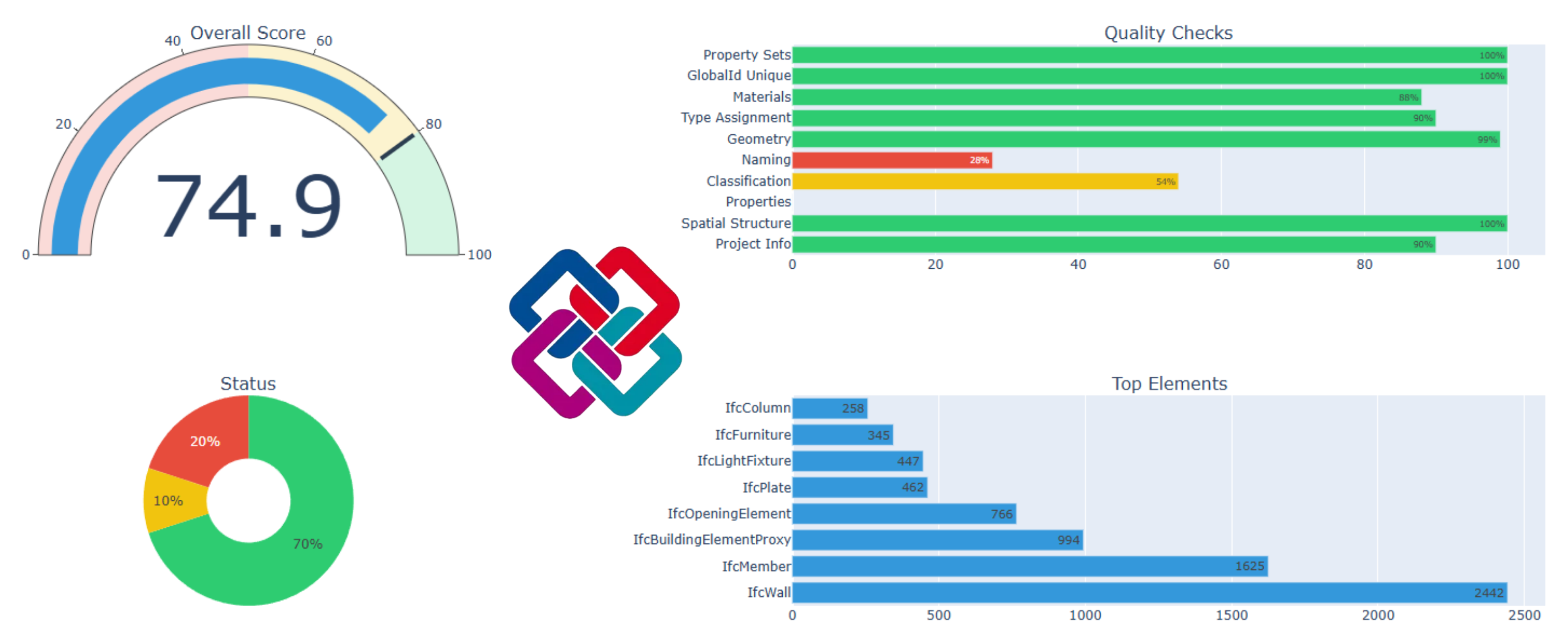
| Check | Score | Status | Issues |
|---|---|---|---|
| Project Info | 90% | ✅ Passed | Missing description |
| Spatial Structure | 100% | ✅ Passed | OK |
| Properties | 0% | ❌ Critical | 8,301 elements missing mandatory properties |
| Classification | 54% | ⚠️ Warning | 3,763 elements without classification |
| Naming | 28% | ❌ Critical | 5,928 elements with naming issues |
| Geometry | 99% | ✅ Passed | 83 elements with geometry issues |
| Type Assignment | 90% | ✅ Passed | 801 elements without type |
| Materials | 88% | ✅ Passed | 967 elements without material |
| Unique GlobalId | 100% | ✅ Passed | OK |
| Property Sets | 100% | ✅ Passed | OK |
Overall Score: 74.9% (7 passed, 1 warning, 2 critical)
Element Distribution#
The model contains 8,301 elements across 22 IFC categories:
| Element Type | Count |
|---|---|
| IfcWall | 2,442 |
| IfcMember | 1,625 |
| IfcBuildingElementProxy | 994 |
| IfcOpeningElement | 766 |
| IfcPlate | 462 |
| IfcLightFixture | 447 |
| IfcFurniture | 345 |
| IfcColumn | 258 |
| Others | 962 |
Analysis Insights#
What's Working Well:
- ✅ Perfect spatial structure (Site → Building → Storeys)
- ✅ 100% property set coverage
- ✅ No duplicate GlobalIds
- ✅ 99% geometry completeness
- ✅ Uniformat classification system detected
Areas for Improvement:
- ❌ Properties: All 8,301 elements are missing at least one mandatory property (Name, Description, ObjectType, Tag). This is common in Revit exports where Description and Tag fields are often left empty.
- ❌ Naming: 71% of elements have naming issues — likely generic names like "Basic Wall" or names with special characters.
- ⚠️ Classification: Only 54% of elements have Uniformat classification. The 3,763 unclassified elements may include furniture, fixtures, and openings that weren't classified in Revit.
Key Takeaways#
This analysis reveals a common pattern: Revit models often have excellent geometry and structure but lack rich metadata. The model is perfectly usable for visualization and coordination, but would need significant data enrichment for:
- Automated quantity takeoffs (missing classifications)
- FM handover (missing descriptions)
- Specification linking (incomplete naming)
This is exactly the kind of insight that helps teams prioritize their BIM data improvement efforts.
Use Cases#
1. Model Deliverable Validation#
Before submitting models to clients or uploading to CDE, run the quality check to ensure compliance with exchange requirements.
2. Design Review Gates#
Integrate quality checks into stage gates. Models must pass minimum thresholds before progressing.
3. Contractor Model Receipt#
When receiving models from subcontractors, verify quality before incorporating into coordination models.
4. Training and Education#
Use the dashboard to teach BIM standards. Students can see exactly which elements fail and why.
5. Process Improvement#
Track quality scores over time to measure team improvement and identify recurring issues.
6. Bid Evaluation#
Compare model quality between different bidders or design options.
Future Improvements#
Planned enhancements for future versions:
- Clash Detection: Basic geometric interference checking
- Quantity Validation: Compare model quantities with schedules
- Custom Check Rules: User-defined validation rules via JSON config
- Trend Analysis: Track quality across multiple model versions
- Multi-language Support: Interface in Portuguese, Italian, Spanish
- PDF Report Export: Formatted reports for documentation
- API Integration: Connect with CDE platforms (ACC, Trimble Connect, etc.)
Conclusion#
The IFC Quality Analysis Dashboard democratizes BIM quality control. What once required expensive software and specialized expertise is now available to anyone with a web browser.
Quality is not optional in BIM — it's the foundation of trust.
Every poorly named element, every missing classification, every orphan space erodes confidence in the model. This tool gives visibility to these issues before they become problems on site.
Try it today. Upload your IFC file, run the analysis, and see where your models stand. The results may surprise you.
It's worth remembering that IFC file quality starts with a good export. For complex models, especially those with multiple links, it's recommended to use specialized tools that ensure consistent and complete exports. If you work with federated models in Revit, this practical guide can help optimize your workflow.
Resources#
- Google Colab: colab.research.google.com
- IfcOpenShell Documentation: ifcopenshell.org
- ISO 19650 Overview: iso.org/standard/68078.html
- buildingSMART Standards: buildingsmart.org
- Uniclass 2015: uniclass.thenbs.com
Have questions or suggestions? The code is open for collaboration. Fork it, improve it, share it.
Questions or Feedback?
I'd love to hear your thoughts on this article. Reach out directly and let's start a conversation.
Follow me on LinkedIn for more BIM tips and updates