
Introduction to Autodesk Construction Cloud#
Autodesk Construction Cloud (ACC) is a unified platform that brings together design, construction, and operations teams in a single cloud-based environment. It represents the evolution of BIM 360, integrating powerful tools for model coordination, issue management, design collaboration, and project documentation.
This article provides a detailed walkthrough of ACC's main modules and interfaces, helping teams maximize productivity and collaboration throughout the construction lifecycle.
ACC Platform Architecture#
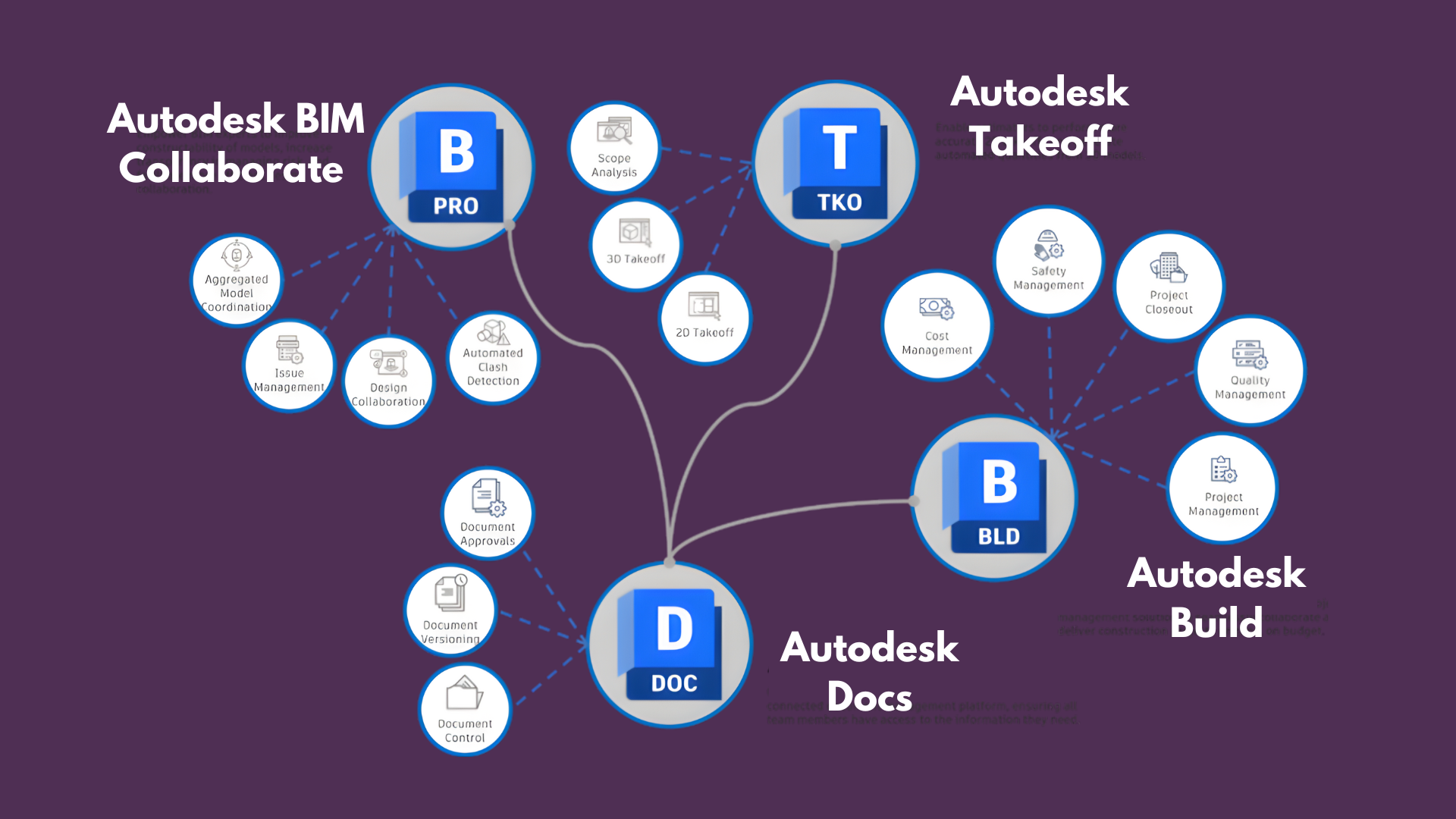
The ACC ecosystem is organized around four core products that work together seamlessly:
- Collaborate Pro: The foundation for BIM collaboration, providing model coordination, issue management, design collaboration, and clash detection
- Build: Field execution management with schedules, submittals, RFIs, and quality control
- Docs: Centralized document management with version control and markup tools
- Takeoff: Quantity takeoff and estimating directly from models and drawings
Within Collaborate Pro, four main modules form the backbone of BIM coordination:
- Model Coordination: Version control and model aggregation
- Issues Management: Centralized problem tracking and resolution
- Design Collaboration: Multi-discipline timeline and sheet management
- Clash Detection: Automated interference detection between disciplines
Model Coordination: Centralized Model Management#
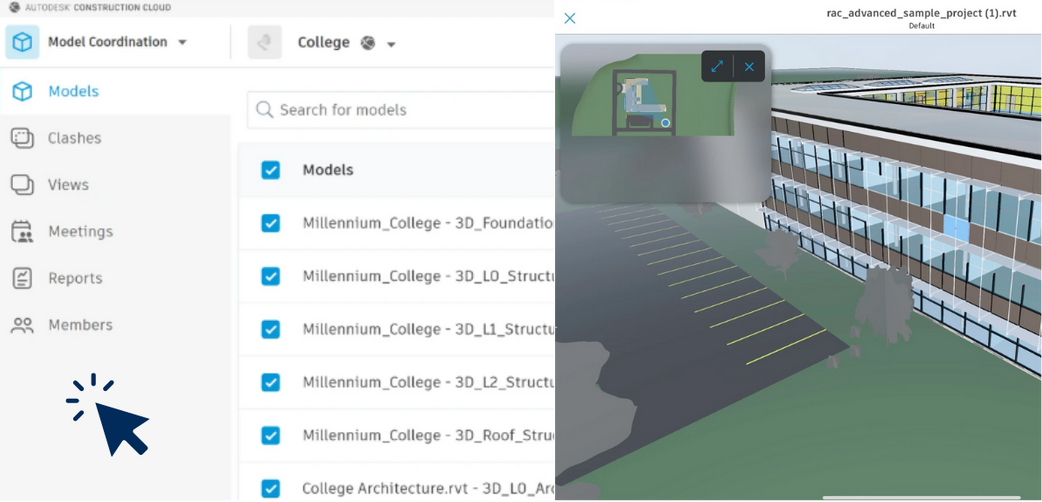
The Model Coordination module serves as the central hub for all project models. For the Millennium College project shown above, you can see:
Left Navigation Panel:
- Models: List of all uploaded models
- Clashes: Access to clash detection results
- Views: Saved viewpoints and camera positions
- Meetings: Coordination meeting records
- Reports: Clash and coordination reports
- Members: Team access management
Central Area: The model list displays multiple Revit files organized by discipline and view type:
- Foundation models
- Structural levels (L0, L1, L2, Roof)
- Each model shows contributor, update date, and clash status
3D Viewer (Right): Real-time visualization of the aggregated model showing the complete building with architectural, structural, and site elements.
This centralized approach eliminates version confusion and ensures all team members work from the same model references.
Issues Management: Structured Problem Resolution#
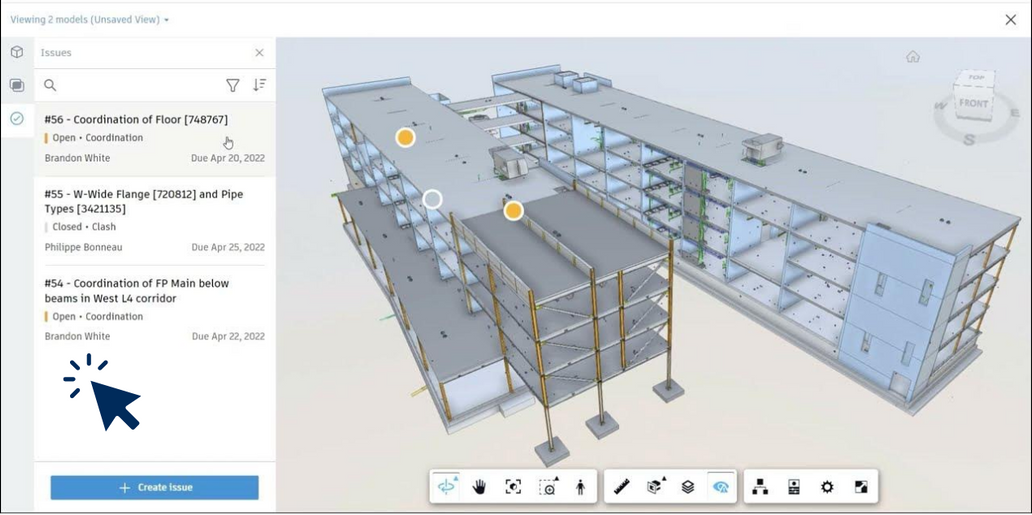
The Issues module transforms ad-hoc problem reporting into a structured workflow:
Issue List (Left Panel):
- Issue #56: Floor coordination - Open status, assigned to Brandon White, due April 20, 2022
- Issue #55: Wide flange and pipe conflicts - Closed, clash type
- Issue #54: Fire protection coordination below beams - Open status
3D Context (Right): Issues are pinned directly to model elements with visual markers, providing instant spatial context. The structural model shows yellow issue markers at specific locations, allowing team members to understand problems in 3D rather than through text descriptions alone.
Create Issue Button: The prominent "+ Create Issue" button enables quick problem reporting with:
- Title and description
- Assignment to team members
- Due dates and priority
- Direct model element attachment
- Photo and markup support
This approach ensures nothing falls through the cracks during coordination.
Design Collaboration: Multi-Discipline Timeline#
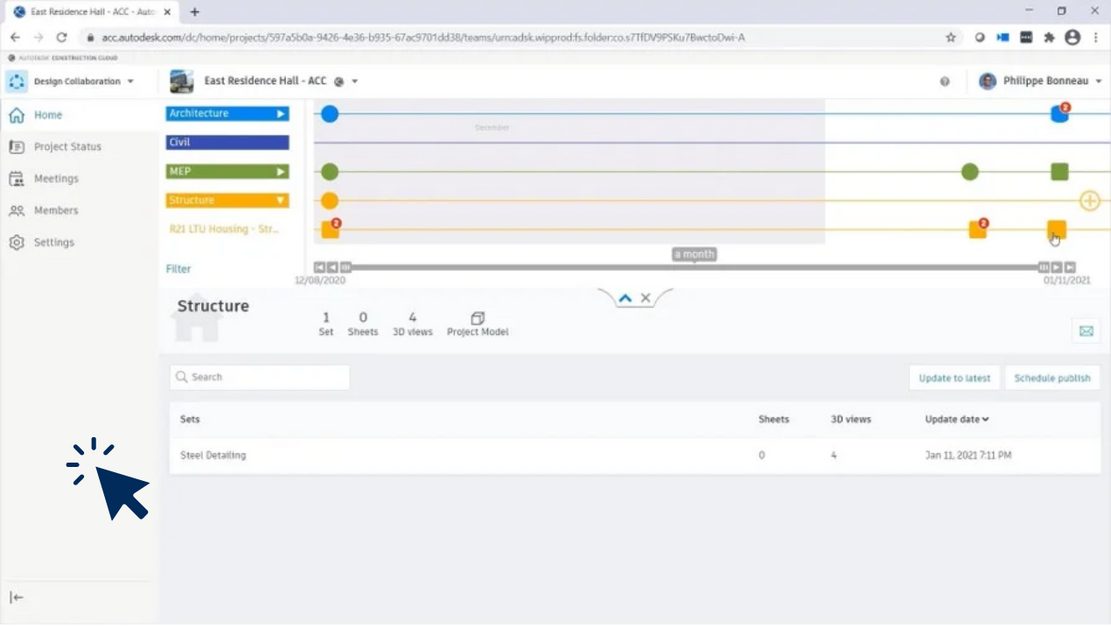
Design Collaboration provides a visual timeline of all discipline updates, enabling teams to track design evolution and coordinate releases:
Timeline Structure: Four discipline tracks are shown with color coding:
- Architecture (blue): Building design updates
- Civil (brown): Site and infrastructure
- MEP (green): Mechanical, electrical, plumbing systems
- Structure (yellow/orange): Structural engineering
Publication Points: Each circle represents a model publication:
- Solid circles: Completed publications
- Hollow circles: Pending or in-progress
- Numbers indicate review comments or issues
Bottom Panel - Sets: The Steel Detailing set shows:
- 4 3D views published
- Last updated January 11, 2021
- Ready for coordination review
This timeline view makes it easy to see when disciplines last published, identify coordination gaps, and schedule multi-discipline clash checks.
Clash Detection: Automated Conflict Identification#
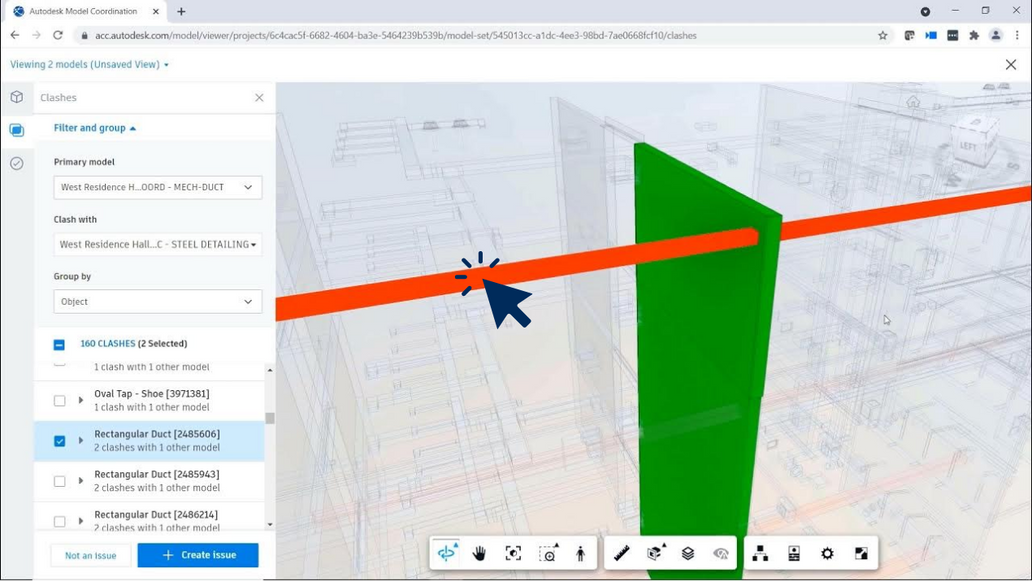
Clash Detection automatically identifies physical conflicts between disciplines:
Filter Panel (Left):
- Primary model: MECH-DUCT (mechanical ductwork)
- Clash with: STEEL DETAILING (structural steel)
- Results: 160 clashes detected
- Grouped by: Object type (Oval Tap - Shoe, Rectangular Duct)
3D Visualization (Right): The viewer highlights the specific clash:
- Green element: Rectangular duct from MEP discipline
- Orange element: Structural steel beam
- Clear interference where the duct passes through the beam path
Clash Workflow:
- Models are uploaded to Model Coordination
- Automated clash tests run on schedule
- Clashes are categorized and assigned
- Design teams resolve conflicts
- Status tracking shows progress to zero clashes
This automated process catches coordination problems early, before they become expensive field conflicts.
Account Administration: Multi-Project Management#
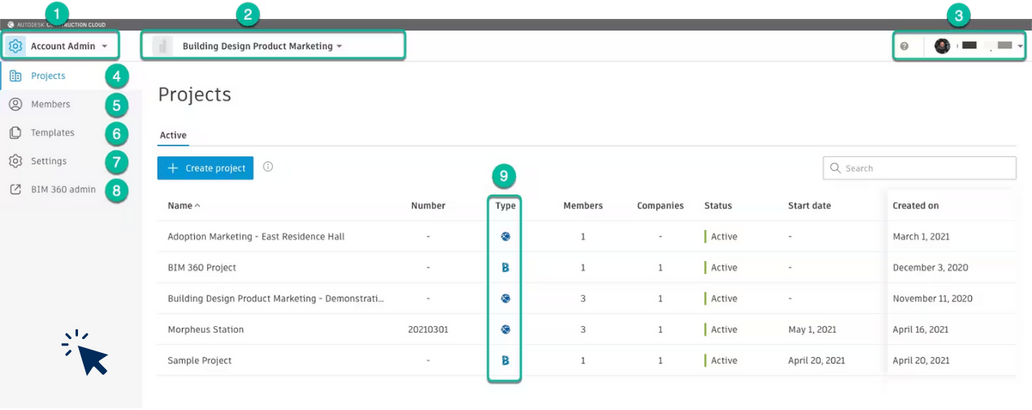
The Account Admin interface provides top-level management across all projects in your ACC account:
Key Interface Elements:
- Account Selector: Switch between multiple ACC accounts
- Account Name: "Building Design Product Marketing"
- User Profile: Account administrator access
- Projects Menu: List of all active and archived projects
- Members: Account-level user management
- Templates: Reusable project templates
- Settings: Account-wide configurations
- BIM 360 Admin: Legacy BIM 360 management
Project List: Projects display key information:
- Type indicators (B for Build, gear for admin projects)
- Member count and company count
- Status (Active/Archived)
- Start date and creation date
Example projects shown:
- Adoption Marketing
- BIM 360 Project
- Building Design Product Marketing - Demonstration
- Morpheus Station
- Sample Project
This centralized view allows administrators to monitor portfolio health and manage resources across the organization.
Project Administration: Team and Product Management#
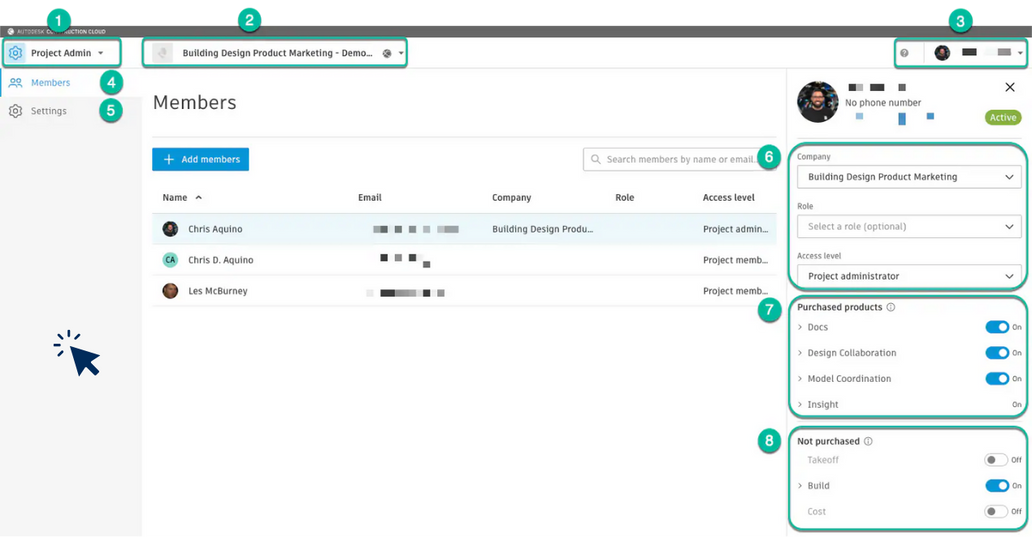
Project Admin controls access and product availability at the project level:
Left Panel - Team Members:
- Chris Aquino (Project admin)
- Chris D. Aquino (Project member)
- Les McBurney (Project member)
Right Panel - Member Details:
6. Access Information:
- Company affiliation
- Role assignment
- Access level (Project administrator)
7. Purchased Products (Active):
- Docs
- Design Collaboration
- Model Coordination
- Insight
All modules shown are enabled (ON status)
8. Not Purchased Products:
- Takeoff (Off)
- Build (On - likely trial or included)
- Cost (Off)
This granular control ensures team members only access modules relevant to their role, while administrators can enable features as project needs evolve.
Docs: Document Management and Control#
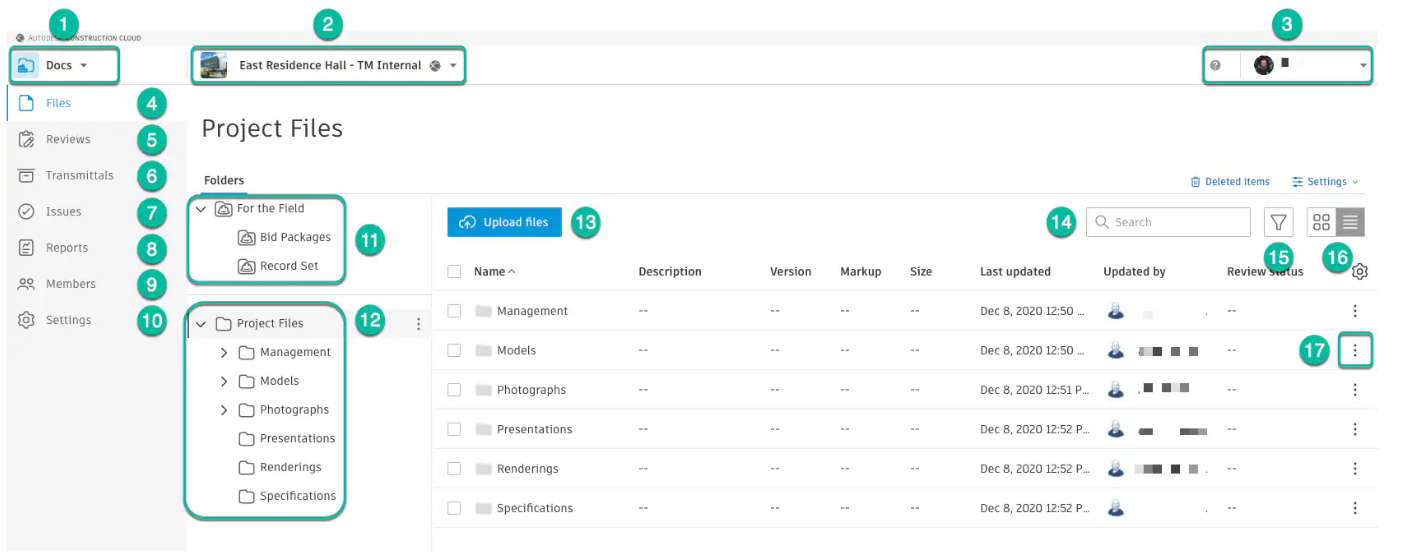
The Docs module centralizes all project documentation with enterprise-grade version control:
Navigation Structure (1-10):
- Docs selector: Switch to documentation module
- Project: "East Residence Hall - TM Internal"
- User profile
4-10. Left menu:
- Files (current view)
- Reviews (markup workflows)
- Transmittals (formal document exchanges)
- Issues (linked to Issues module)
- Reports
- Members
- Settings
Folder Structure (11-12):
- For the Field: Bid Packages, Record Set
- Project Files: Management, Models, Photographs, Presentations, Renderings, Specifications
Action Toolbar (13-17): 13. Upload files: Drag-and-drop or browse 14. Search: Find documents by name or content 15-16. View options: Grid or list view 17. Actions menu: Download, share, permissions
File List Columns:
- Name and Description
- Version number (automatic versioning)
- Markup status (review annotations)
- File size
- Last updated date and user
- Review status (approval workflow)
Docs ensures teams work from current documents while maintaining complete version history for audit trails.
Design Collaboration: Advanced Timeline Features#
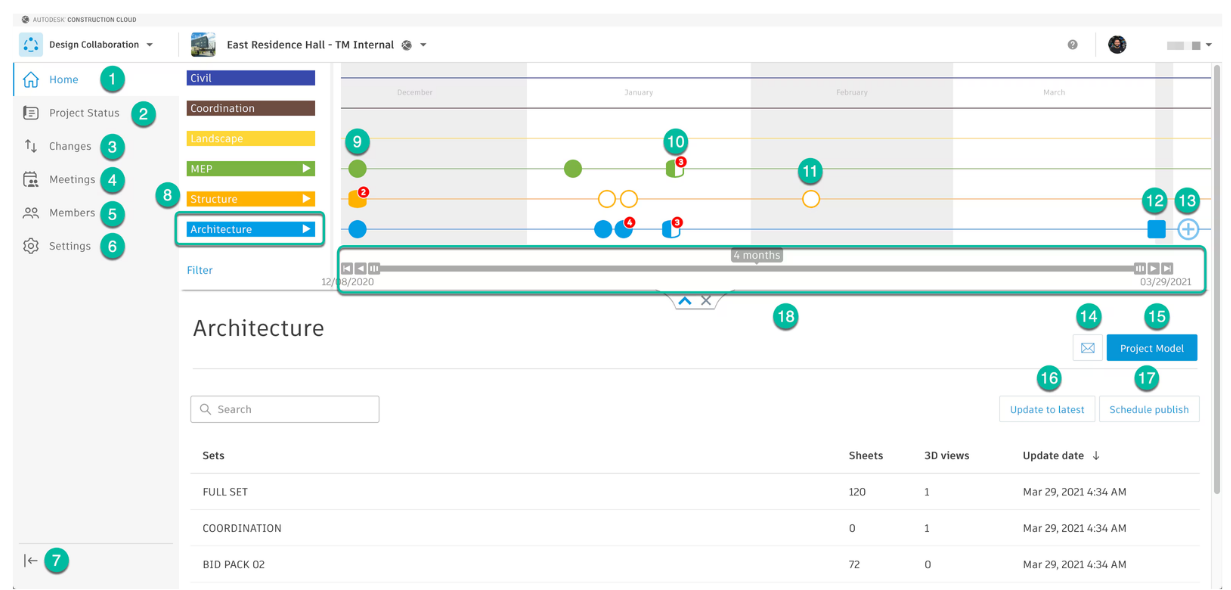
A more detailed view of Design Collaboration reveals advanced coordination features:
Left Navigation (1-6):
- Home: Dashboard view
- Project Status: Overall health metrics
- Changes: Track design modifications
- Meetings: Coordination session records
- Members: Team management
- Settings: Module configuration
- Collapse menu: Expand workspace
Timeline Features (8-13):
8. Discipline Expansion: Each discipline has expandable arrows revealing:
- Individual sets within the discipline
- Civil, Coordination, Landscape, MEP, Structure, Architecture
9-13. Publication Status Indicators:
- Filled circles: Complete publications
- Empty circles: Pending or draft
- Numbered badges: Comments or issues attached to that publication
- Dates span the project timeline
Bottom Panel - Set Details (14-18):
- Email notifications: Alert team on updates
- Project Model: Aggregated coordination model
- Update to latest: Refresh local cache
- Schedule publish: Plan future releases
- Timeline zoom: Adjust view (4 months shown)
Set Table:
- FULL SET: 120 sheets, 1 3D view
- COORDINATION: 0 sheets, 1 3D view (model-only)
- BID PACK 02: 72 sheets, 0 3D views
This interface makes it easy to coordinate releases, ensure all disciplines are synchronized, and maintain clear communication about design status.
Model Coordination: Detailed Model Management#
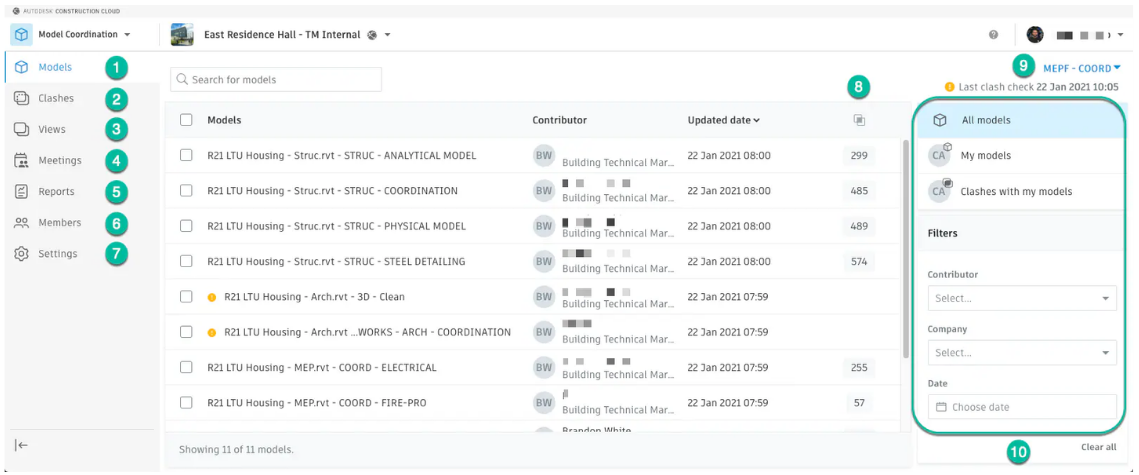
An in-depth look at Model Coordination for the R21 LTU Housing project:
Navigation Menu (1-7):
- Models
- Clashes
- Views
- Meetings
- Reports
- Members
- Settings
Model List (8): Multiple Revit models organized by discipline and view:
Structural Models:
- STRUC - ANALYTICAL MODEL
- STRUC - COORDINATION
- STRUC - PHYSICAL MODEL
- STRUC - STEEL DETAILING
Architectural Models:
- ARCH - 3D-Clean
MEP Models:
- MEP - ELECTRICAL
- MEP - FIRE-PRO
Each entry shows:
- Model name and view
- Contributor (who uploaded)
- Updated date
- Clash count
Active Filter (9): "MEPF - COORD" filter applied Last clash check: January 22, 2021, 10:05
Filter Options (10):
- All models
- My models
- Clashes with my models
- Filter by: Contributor, Company, Date
This organization allows large multi-discipline teams to find relevant models quickly and track coordination status at a glance.
Insight: Project Analytics Dashboard#
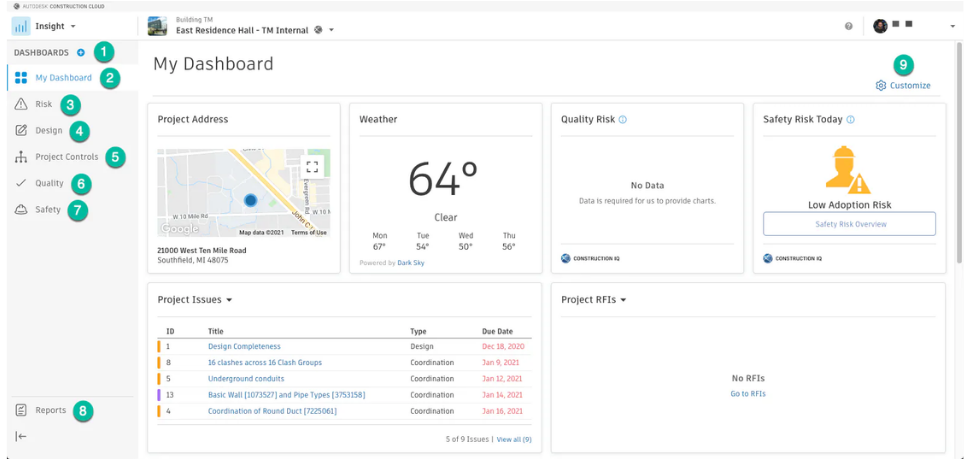
Insight provides data-driven project intelligence through customizable dashboards:
Dashboard Navigation (1-2):
- DASHBOARDS selector: Switch between analytics views
- My Dashboard: Personalized view
Category Menu (3-7): 3. Risk 4. Design 5. Project Controls 6. Quality 7. Safety
Reports Section (8): Access to detailed analytics reports
Dashboard Widgets:
Project Address: Interactive map showing project location:
- 21000 West Ten Mile Road, Southfield, MI 48075
- Geolocation context for logistics planning
Weather: Current conditions and forecast:
- 64°F, Clear conditions
- Weekly forecast for site planning
Quality Risk: "No Data" - requires integration with quality workflows
Safety Risk Today: "Low Adoption Risk" - team engagement metrics
Project Issues: Table view showing:
- Issue ID
- Title (design and coordination issues)
- Type classification
- Due date tracking
Project RFIs: "No RFIs" - request for information tracking
Customize Button (9): Add, remove, or rearrange widgets to match team needs
Insight transforms project data into actionable intelligence, helping teams identify risks early and make informed decisions.
Conclusion: Integrated Collaboration Ecosystem#
Autodesk Construction Cloud represents a comprehensive approach to construction project delivery:
Key Benefits:
- Centralized Data: Single source of truth for models, documents, and issues
- Real-Time Collaboration: Multi-discipline teams work in sync
- Automated Quality Control: Clash detection and issue tracking reduce rework
- Scalable Administration: Account and project-level controls for any team size
- Data-Driven Insights: Analytics drive better decision-making
Best Practices:
- Establish clear model publishing schedules per discipline
- Use Issues module for all coordination problems
- Run automated clash tests before coordination meetings
- Leverage Docs for version-controlled deliverables
- Customize Insight dashboards to track team-specific KPIs
Whether you're coordinating a small renovation or a multi-billion dollar infrastructure project, ACC provides the tools to deliver on time, on budget, and with fewer conflicts.
The platform continues to evolve with regular updates, expanding capabilities in AI-assisted quality control, carbon tracking, and advanced analytics - positioning teams for the future of digital construction.
Questions or Feedback?
I'd love to hear your thoughts on this article. Reach out directly and let's start a conversation.
Follow me on LinkedIn for more BIM tips and updates